In grading entry (multiple Tests) Can dropped coursed be highlighted with drop date ?

+1 vote
1,109 views
asked Apr 5, 2016 in Tuition by Pinkus
edited Apr 5, 2016 by Pinkus
commented Apr 5, 2016 by Admin
Please explain in more detail which screen and what you need changed.
commented Apr 5, 2016 by Pinkus
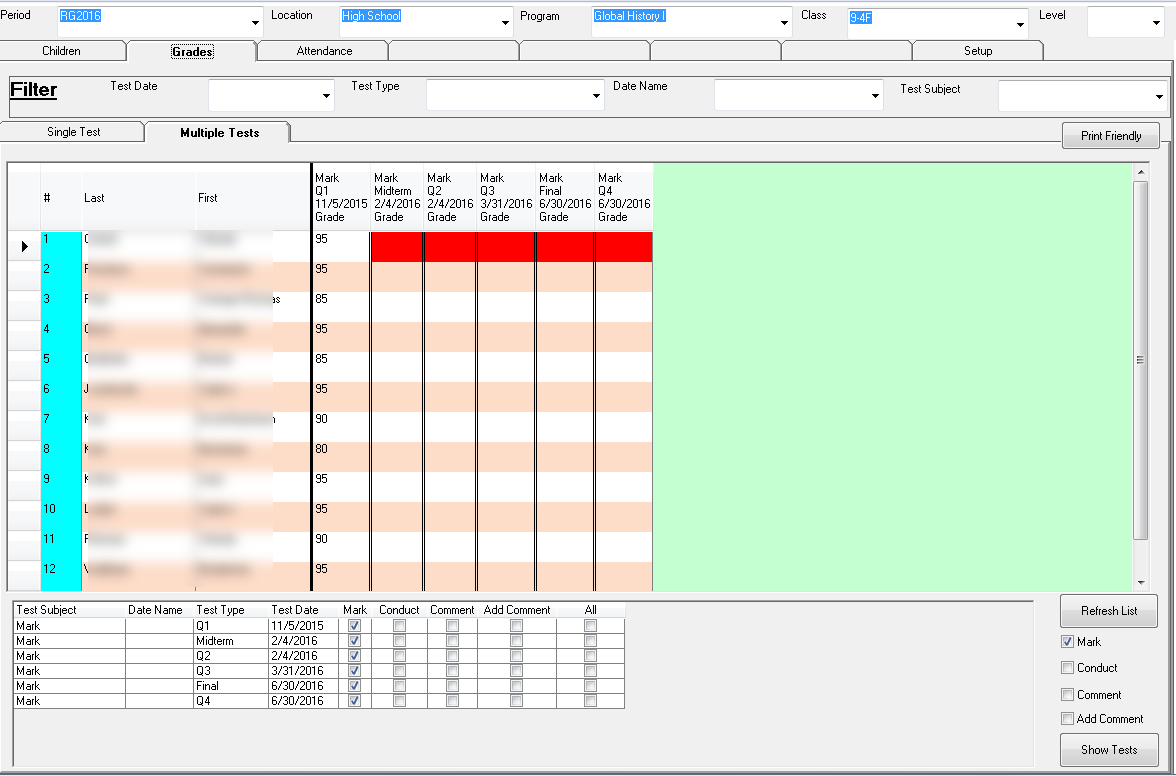
in Courses - Grades- when you do grading in -Multiple Tests- it shows up a student with out a mark in this current QR testing, and we cant figure out why, then after researching i see his course was dropped in middle of the Qr and thats why he wasn't marked .

so my question is would it be possible to add there (a column or something) that would show me next to that student a drop date so we see why there is no mark on that course ?
commented Apr 5, 2016 by Admin
Not really. Its pulling multiple classes at once and only showing 1 column per program.
commented Apr 5, 2016 by Pinkus
is there any advise you can offer ?
commented Apr 13, 2016 by Admin
If this works for you please click on the check box to mark as complete.
commented Apr 13, 2016 by Mimi Horowitz
thank you for this, it is a great addition and is very helpful to me.

1 Answer

answered Apr 11, 2016 by Admin
selected Apr 13, 2016 by Pinkus
 
Best answer

Done.

Choose the option from the Menu Highlight Multi Grades if Dropped.

It will change the background to red.


Let's Welcome our New Members

  • Wck of Willowbrook Community Kollel - Feb 17, 2026

  • Mr Y greenwald of Tov vchesed Rachmistrivka - Feb 10, 2026

  • Kritzler YS of pupa - Feb 09, 2026

  • Shimon of Vehareinu Skver - Feb 09, 2026

  • Gutwein of Lakefront - Feb 08, 2026

  • dgross of yeshiva orchos chaim - Feb 03, 2026

  • SrulyF of JLS - Feb 02, 2026

  • Flor of Little Munchkins Playgroup 56 Inc - Jan 29, 2026
...
