Sync Calendar with Outlook

+1 vote
694 views
asked Dec 25, 2016 in New Feature Requests by Admin
retagged Nov 12, 2020 by yczehn

1 Answer

answered Dec 25, 2016 by Admin
 
Best answer

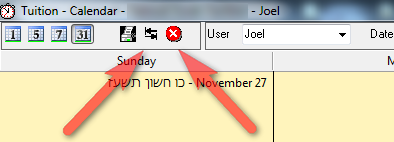
We added the option of syncing the calendar with outlook. This feature will send all your uncompleted tasks and appointments to outlook.

Once a task is complete it will not be updated any more in outlook. You will need to mark it complete in outlook separate of marking it complete in our software.

To Sync you click on the Sync button on top of the calendar. To delete all tasks from the outlook calendar that has been sent from the software (Including completed tasks), click on the Delete icon on top of the calendar.



Let's Welcome our New Members

  • Wck of Willowbrook Community Kollel - Feb 17, 2026

  • Mr Y greenwald of Tov vchesed Rachmistrivka - Feb 10, 2026

  • Kritzler YS of pupa - Feb 09, 2026

  • Shimon of Vehareinu Skver - Feb 09, 2026

  • Gutwein of Lakefront - Feb 08, 2026

  • dgross of yeshiva orchos chaim - Feb 03, 2026

  • SrulyF of JLS - Feb 02, 2026

  • Flor of Little Munchkins Playgroup 56 Inc - Jan 29, 2026

  • avneitzedek13 of Avnei Tzedek Shull - Jan 29, 2026

...