How do I Attach or Scan a image or document to a deposit.

+2 votes
562 views
asked Mar 12, 2015 in How To by Admin
How do I Attach or Scan an image or document to a deposit.

1 Answer

answered Mar 12, 2015 by Admin
 
Best answer

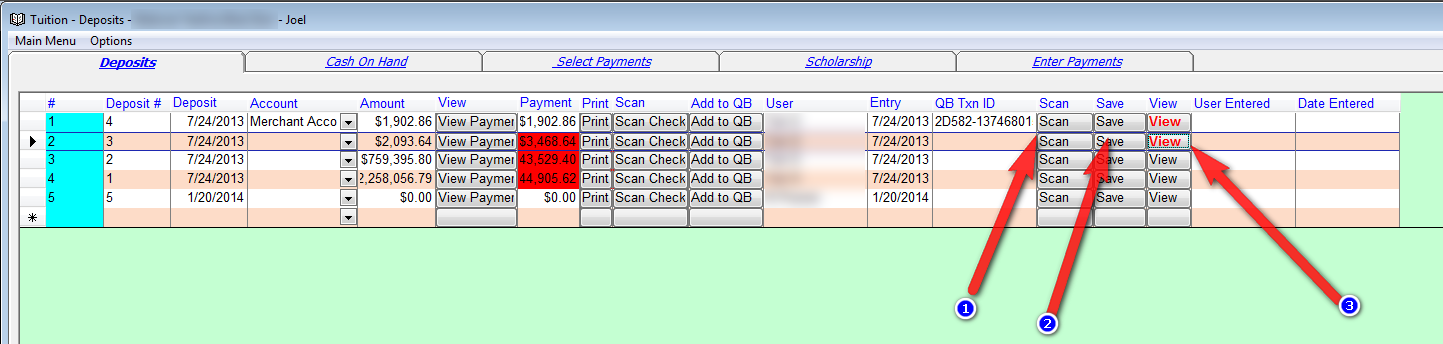
We added three columns in each deposit row. This will enable you to a scan or attach a single image or document to a deposit row.


To scan press on the scan button (1) after creating the deposit.

To save a document or file click on the save button (2).

To view the attachment click on the view column (3).

The word View in the View column will be red if there is any data attached.
 

commented Jul 8, 2015 by Admin
This has now been added to fundraising.
commented Jul 8, 2015 by satmar-montreal
thank you

Let's Welcome our New Members

  • npam of Bais Yaakov Elementary School - Feb 26, 2026

  • Zalmenrosenberger of Lizensk - Feb 25, 2026

  • Baistziporah of Bais Tziporah - Feb 25, 2026

  • Meisels S of Mosdos Satmar BP Inc. (UTA BP) - Feb 24, 2026

  • Wck of Willowbrook Community Kollel - Feb 17, 2026

  • Mr Y greenwald of Tov vchesed Rachmistrivka - Feb 10, 2026

  • Kritzler YS of pupa - Feb 09, 2026

  • Shimon of Vehareinu Skver - Feb 09, 2026

  • Gutwein of Lakefront - Feb 08, 2026

...
