question-closed I did a mail merge and the address seems flipped or missing spaces. How can I correct this?

0 votes
311 views
asked Mar 4, 2015 in How To by Admin
closed Mar 4, 2015 by Admin

The problem is because MS Word is mistakenly trying to format your numbers as they should be formated when there is hebrew text around it. (Right-To-Left). So to fix it we need to tell MS Word to keep it Left-To-Right. Unfortunately MS Word doesn't have a direct way of changing this setting. So in order to get to this setting follow


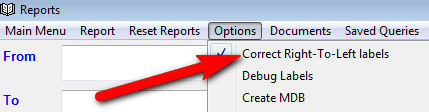
1. In the report screen click on the menu "Options" and select "Correct Right-to-Left Labels".
 

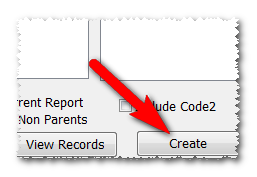
2. Click "Create" on any mail merge.
 

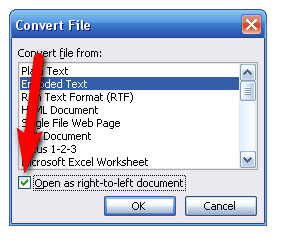
3. A dialog will pop up and de-select the option  "Open as Right-to-left document".


closed with the note: JLS Solutions Help - Comments Only

Let's Welcome our New Members

  • RRKLEIN of Meor Yitzchok - Mar 10, 2026

  • MGoldstein of Bobov-45 - Mar 09, 2026

  • israelw of Meor Yitzchok - Mar 09, 2026

  • npam of Bais Yaakov Elementary School - Feb 26, 2026

  • Zalmenrosenberger of Lizensk - Feb 25, 2026

  • Baistziporah of Bais Tziporah - Feb 25, 2026

  • Meisels S of Mosdos Satmar BP Inc. (UTA BP) - Feb 24, 2026

  • Wck of Willowbrook Community Kollel - Feb 17, 2026

  • Mr Y greenwald of Tov vchesed Rachmistrivka - Feb 10, 2026

...
