Home
Support
About Us
Voice and SMS Campaigns
Online Q&A
Login
Remember
Register
JLS Solutions Q&A
All Activity
Unanswered
Tags
Categories
Users
Support Requests
Tutorials
Ask a Question
How can I set that a user must choose a merchant account when charging a card?
+1
vote
517
views
asked
Mar 28, 2018
in
Support Questions
by
Admin
fundraising
tuition
credit-card
new-feature
commented
Mar 29, 2018
by
Bobov-45
Can this option be added in Tuition as Well?
commented
Mar 29, 2018
by
Admin
Option is not new. We just now added to fundraising an easy way to set it. Once you set it in Fundraising it will work for tuition too.
To set in Tuition (If you do not have Fundraising) do the following.
1) Go to Administration Screen.
2) Choose Menu Options, Admin, Add Setting
3) Enter Force Merchant for setting name.
4) Answer No as this setting is not for a single user.
5) Enter True.
Log out and back in. Now you cannot charge a card without entering a merchant number.
1 Answer
answered
Mar 28, 2018
by
Admin
Best answer
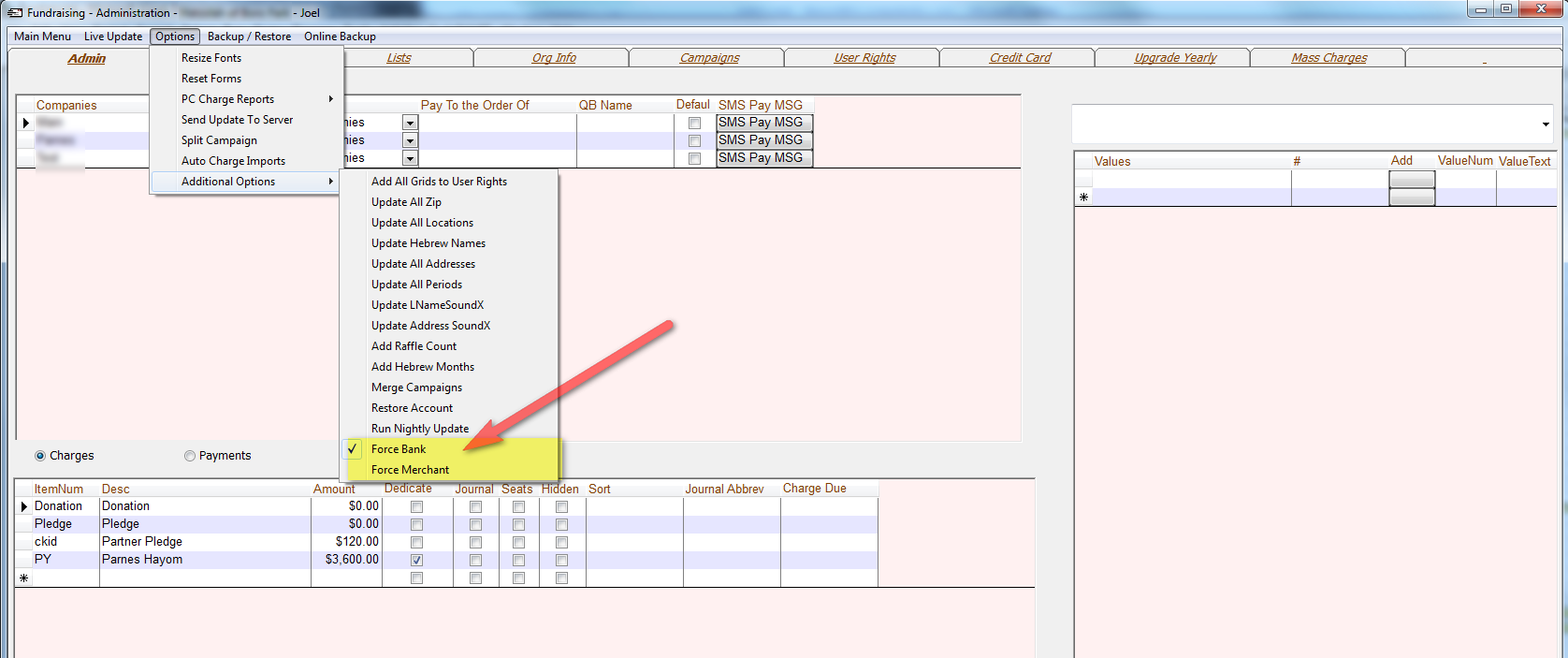
In Fundraising go to the Administration Screen and set the setting Force Merchant from the menu.
All categories
How To
(705)
Minor Enhancements
(508)
Reports
(107)
New Feature Requests
(644)
Support Questions
(268)
School Administrators
(56)
Fundraisers
(62)
Off-Topic
(85)
New Feature
(203)
Let's Welcome our New Members
...