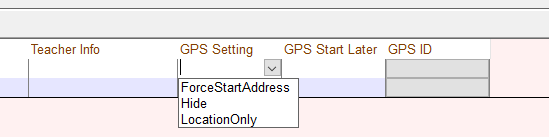
New GPS Features - Per Bus Settings

+2 votes
706 views
asked Mar 20, 2024 in New Feature by yitzchok
edited Mar 20, 2024 by yitzchok
1) Option to turn off tracking for a single bus

2) Option to enable Location only for a single bus

1 Answer

answered Mar 20, 2024 by yitzchok
selected Mar 20, 2024 by Admin
 
Best answer

In the "Bus Routes" Screen go to tab Route/Bus Setup>Buses

To turn off tracking for a single bus select "Hide"

To enable "Location only" for a single bus select "LocationOnly"

commented Feb 11 by SMT
The Hide option does not seem to work
commented Feb 25 by Shalom
edited Feb 25 by Shalom
You need to set it up by Routes Option. In this section, you will find a column named GPS Name. In this column, you can enter the word "Hide," which will conceal this route from the parents.
commented Feb 25 by SMT
edited Feb 25 by SMT
.
commented Feb 25 by Shalom

See

commented Feb 25 by SMT
This is to hide the entire route (all buses), i only want to hide 1 bus and this does not work

Let's Welcome our New Members

  • npam of Bais Yaakov Elementary School - Feb 26, 2026

  • Zalmenrosenberger of Lizensk - Feb 25, 2026

  • Baistziporah of Bais Tziporah - Feb 25, 2026

  • Meisels S of Mosdos Satmar BP Inc. (UTA BP) - Feb 24, 2026

  • Wck of Willowbrook Community Kollel - Feb 17, 2026

  • Mr Y greenwald of Tov vchesed Rachmistrivka - Feb 10, 2026

  • Kritzler YS of pupa - Feb 09, 2026

  • Shimon of Vehareinu Skver - Feb 09, 2026

  • Gutwein of Lakefront - Feb 08, 2026

...