How do I choose only a few accounts when creating a mail merge?

+4 votes
995 views

1 Answer

answered May 17, 2018 by Admin
 
Best answer

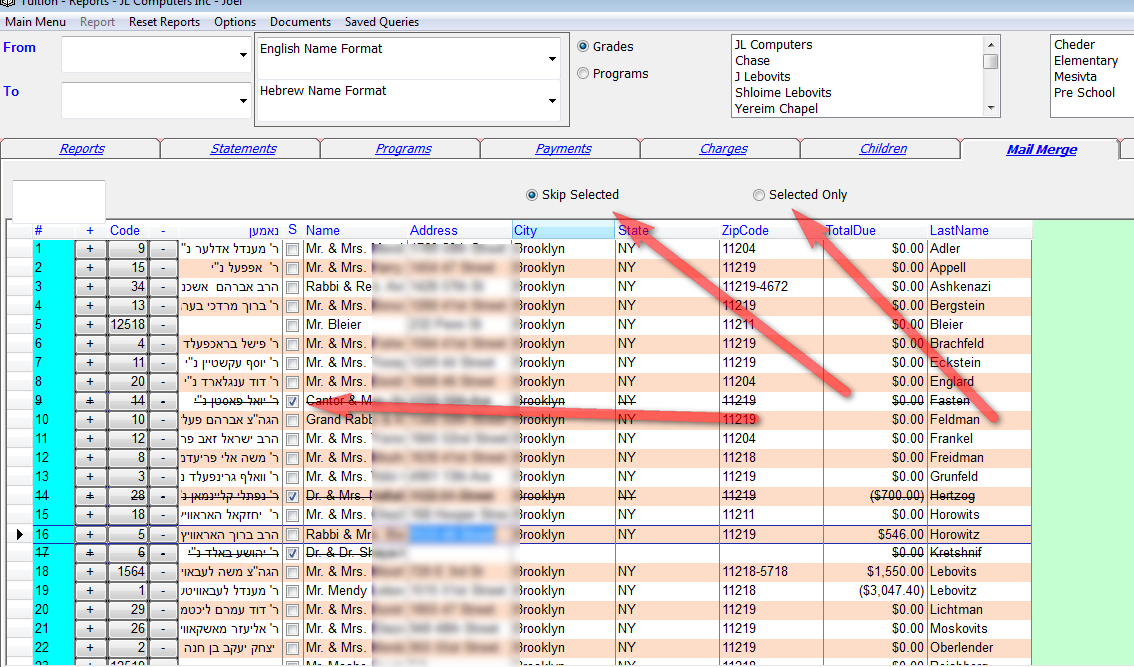
We just added to the Tuition application the option to choose from a list before finalizing the mail merge. After viewing the records before clicking on create you can choose records by clicking on the Select column.

By default it will skip the selected records. If you want to merge only the selected records change the option on top to Selected Only.



commented May 24, 2018 by Mrs. Stendig
thank you for this great feature!
commented May 25, 2018 by moshe8414
How am i upgrading this new feature?
commented May 25, 2018 by moshe8414
Thanx!
commented May 30, 2018 by TC
After its selected can i save it? (The same as i used to do with my list and +)
commented May 30, 2018 by Admin
No. To save use lists. This is if you do not want to save.

Let's Welcome our New Members

  • npam of Bais Yaakov Elementary School - Feb 26, 2026

  • Zalmenrosenberger of Lizensk - Feb 25, 2026

  • Baistziporah of Bais Tziporah - Feb 25, 2026

  • Meisels S of Mosdos Satmar BP Inc. (UTA BP) - Feb 24, 2026

  • Wck of Willowbrook Community Kollel - Feb 17, 2026

  • Mr Y greenwald of Tov vchesed Rachmistrivka - Feb 10, 2026

  • Kritzler YS of pupa - Feb 09, 2026

  • Shimon of Vehareinu Skver - Feb 09, 2026

  • Gutwein of Lakefront - Feb 08, 2026

...