Display Last Four Digits of Credit Card in Deposits Tab

+5 votes
267 views
asked Dec 25, 2025 in New Feature Requests by CR

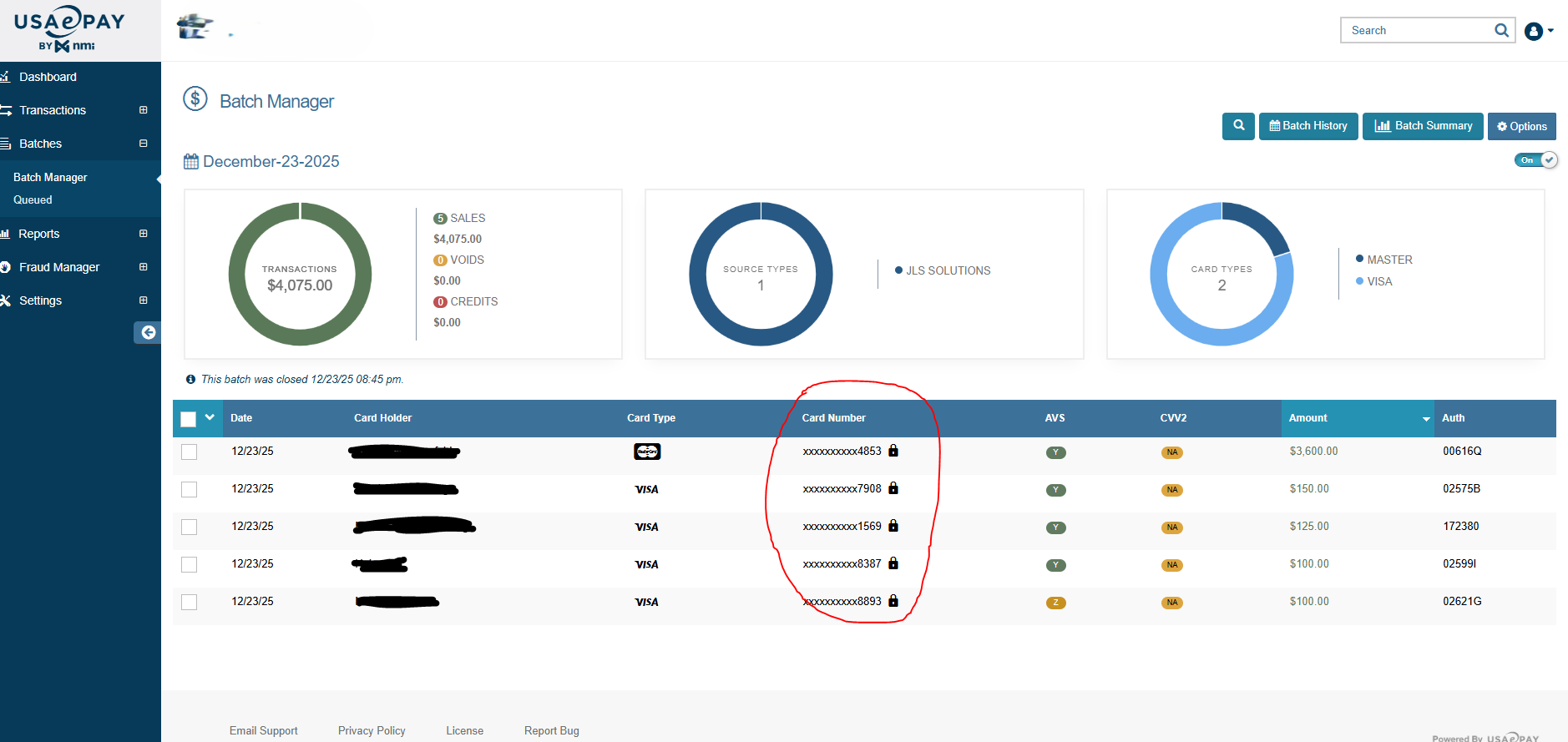
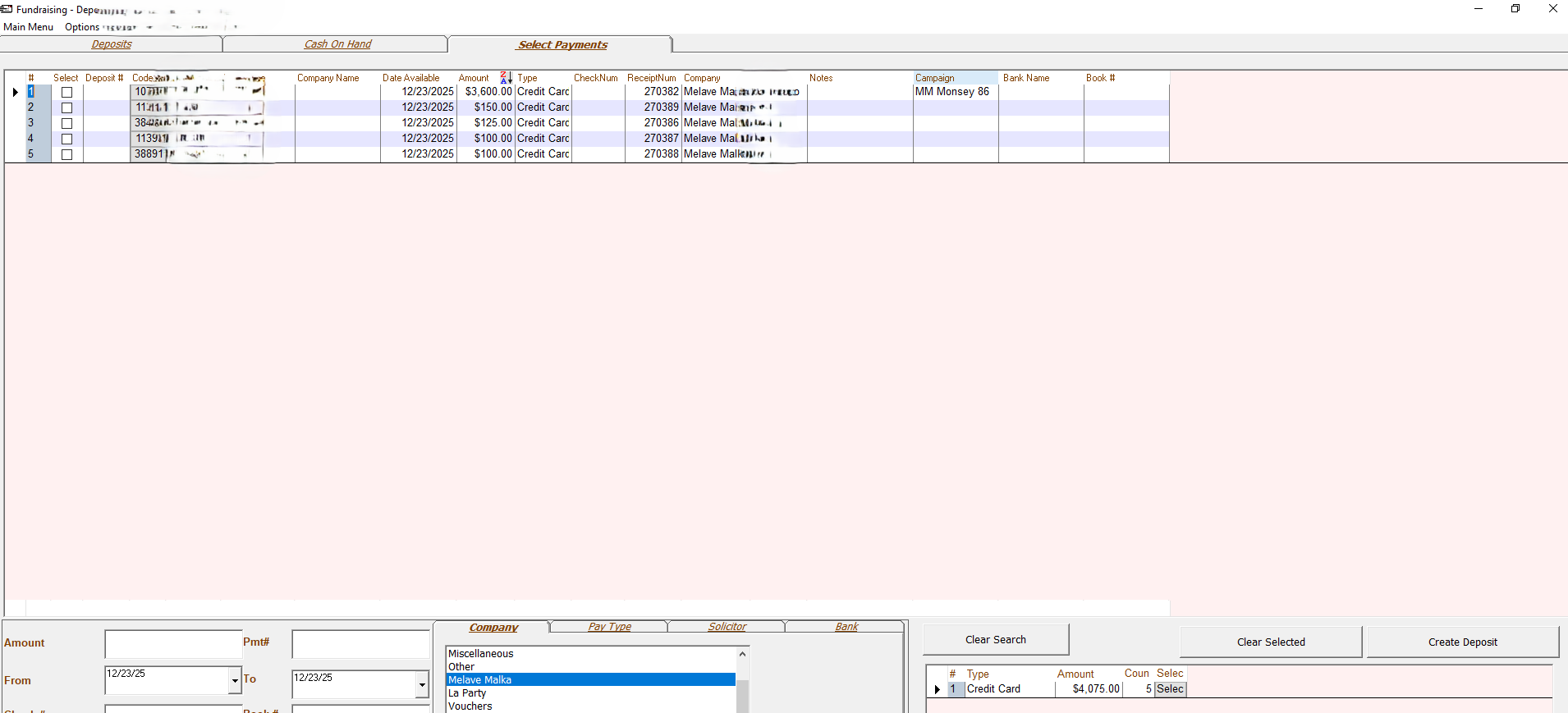
Please display the last four digits of the credit card on the Deposits > Select Payments tab. This update would significantly help us match the information to the credit card batch details. Currently, the CC batch only shows the name as it was entered in the JL Credit Card details under Credit Card > On File > Name, or the JL account's last name if the name field is left blank. In some cases, the name on the card differs from the JL account name, making it challenging to match the information to the batch. Adding the last four digits of the credit card would help us resolve these discrepancies. I've attached pictures for your reference.

Thank you!  
commented Dec 26, 2025 by Tzvi Liberman
I think this would be very helpful, especially if a card is used with a different name than the account holder

1 Answer

answered Dec 28, 2025 by Admin
Like explained multiple times in the Q&A there is no direct link between the cc record and the payment record.
commented Dec 29, 2025 by CR

I understand your point. However, in the "payment record", there is a field labeled "CC Info" that shows the last 4 digits of the credit card number along with the expiration date. This information could be included.

One significant benefit of adding the last four digits of the credit card is that it would allow you to sort the payments in JL deposits and the credit card batch by these digits. This way, you could match all payments in just a few seconds.


commented Dec 29, 2025 by Admin
Even in the payments tab that field cannot be sorted because its not linked data.

Why don't just select all cc from that day? Its not matching?
commented Dec 29, 2025 by CR
I am currently selecting all the credit card transactions for that day, as you suggested. However, I must be honest: it is quite inconvenient to match them. When a batch contains many transactions, it can be challenging to identify them solely by name and amount, especially when multiple transactions share the same last name, which is common in our community. Additionally, there is an issue where the credit card holder's name differs from the name on the JL account. I would greatly appreciate it if you could address this update.

As a satisfied JL customer for many years, I want to express my gratitude for your attention!
commented Dec 29, 2025 by Admin
Sorry, but we cannot add that option as the info is not there. But am trying to understand what are you trying to match. If the batch amount and total cc are the same amount why do you need to go thru each transaction separately?
commented Dec 29, 2025 by CR
It's important to understand that when you select all credit card transactions for a specific day, it may include transactions that are not processed in the credit card batch, such as OJC Matbia. Consequently, the total for that particular day may not match the total from the credit card batch. Therefore, this method cannot be relied upon to provide the exact total. You need to match each transaction to the credit card batch, which is where I am encountering the issues mentioned.
commented Dec 29, 2025 by Admin
So that's why most people have the CC type as the type, so Visa, Mastercard and Matbia come in separate. Then it 99% of the time matches exactly. Sorry there isn't much more we can do at this time.
commented Dec 29, 2025 by mering
We also Have cc type as the type

I dont see it coming in separably
commented Dec 29, 2025 by Admin
Contact support to change the setting to have Visa come in as Visa, and Matbia As Matbia. So you can group them together by deposits.

Let's Welcome our New Members

...