You can now view Student Additional Info when entering multiple Hebrew or English class for children.

0 votes
349 views
asked Mar 4, 2015 in How To by Admin
reopened Dec 25, 2018 by yczehn
You can now view Student Additional Info when entering multiple Hebrew or English class for children.

1 Answer

answered Dec 25, 2018 by yczehn
 
Best answer

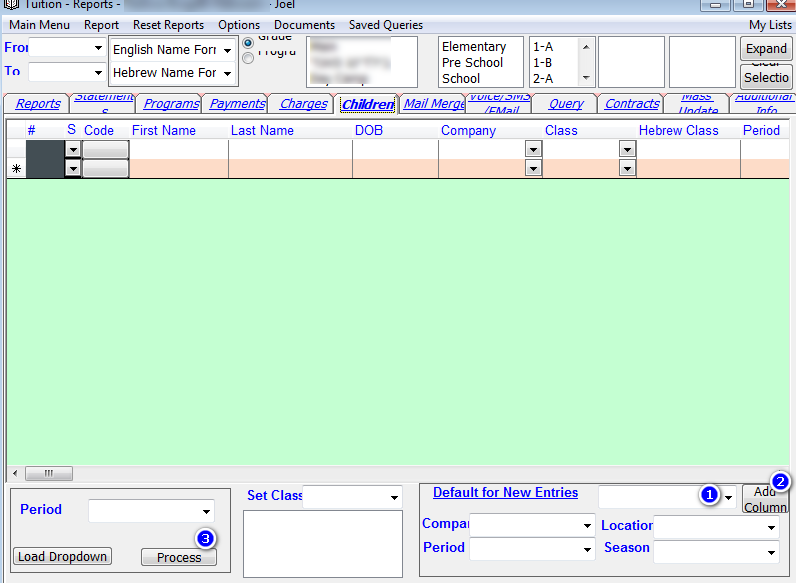
We recently had a lot of user request to be able to see student additional info in the screen that you choose all the children which class they will be assigned to. This can be very useful if you decide the class based on information you collected on the student. (For example you put in class 1A everyone coming from one school, while in class 1B everyone coming from a different school).


To view the additional info go to the bottom left and choose the additional info you want from the drop down (1). Then click on the Add Column button (2). Repeat for all the additional information you want displayed. When done click on process (3) and you will have the info there. Please note: The info cannot be changed in this screen.
Let's Welcome our New Members

  • RRKLEIN of Meor Yitzchok - Mar 10, 2026

  • MGoldstein of Bobov-45 - Mar 09, 2026

  • israelw of Meor Yitzchok - Mar 09, 2026

  • npam of Bais Yaakov Elementary School - Feb 26, 2026

  • Zalmenrosenberger of Lizensk - Feb 25, 2026

  • Baistziporah of Bais Tziporah - Feb 25, 2026

  • Meisels S of Mosdos Satmar BP Inc. (UTA BP) - Feb 24, 2026

  • Wck of Willowbrook Community Kollel - Feb 17, 2026

  • Mr Y greenwald of Tov vchesed Rachmistrivka - Feb 10, 2026

...
