How can I send out bus name and stop number to all parents

0 votes
935 views
asked Jun 30, 2019 in How To by Admin
edited Jun 30, 2019 by YakovKantor

1 Answer

answered Jun 30, 2019 by Admin
selected Jun 30, 2019 by YakovKantor
 
Best answer


  1. Query all the people that should receive the text
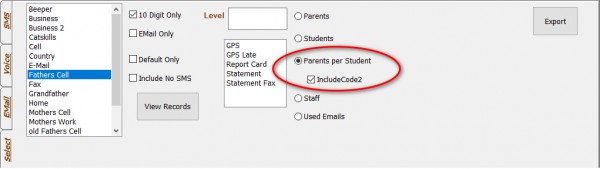
  2. Go to Voice/SMS/Email and select the phone type and Parent Per Student 
      
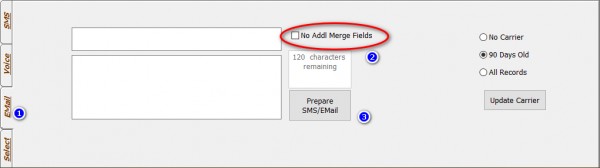
  3. Select the Email Tab (Or SMS if you have it setup) and Deselect the No Addl Merge Filed option.
     
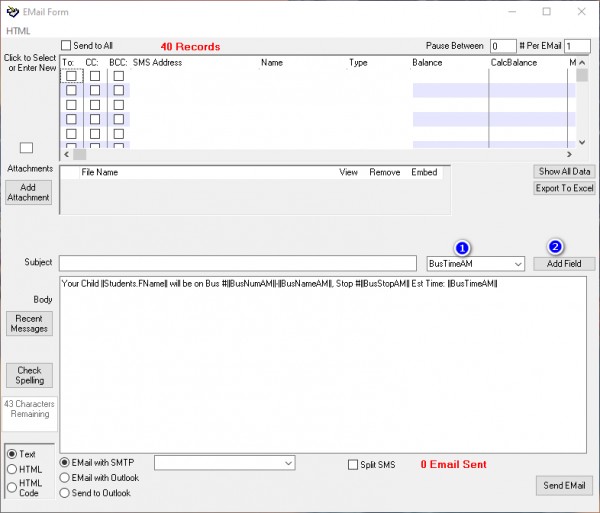
  4. Put in the fields using the add field dropdown 


For Example:

Your Child ||Students.FName|| will be on Bus #||BusNumAM||-||BusNameAM||, Stop #||BusStopAM|| Est Time: ||BusTimeAM||

Will be sent as:

Your Child Chany will be on Bus #34-Red, Stop #25. Est Time: 9:25 AM


Please Note: The period for the bus route is taken from the main report screen.

 

commented Jul 2, 2019 by bnos chaya
The email server can stop you after sending a few

Q is there a way to see where they stopped you to try to send it again from the place they stopped you ?

Let's Welcome our New Members

  • npam of Bais Yaakov Elementary School - Feb 26, 2026

  • Zalmenrosenberger of Lizensk - Feb 25, 2026

  • Baistziporah of Bais Tziporah - Feb 25, 2026

  • Meisels S of Mosdos Satmar BP Inc. (UTA BP) - Feb 24, 2026

  • Wck of Willowbrook Community Kollel - Feb 17, 2026

  • Mr Y greenwald of Tov vchesed Rachmistrivka - Feb 10, 2026

  • Kritzler YS of pupa - Feb 09, 2026

  • Shimon of Vehareinu Skver - Feb 09, 2026

  • Gutwein of Lakefront - Feb 08, 2026

...