question-closed I have multiple records to enter and I want to set a default value for a few columns. How?

0 votes
303 views
asked Mar 4, 2015 in How To by Admin
closed Mar 9, 2015 by Admin

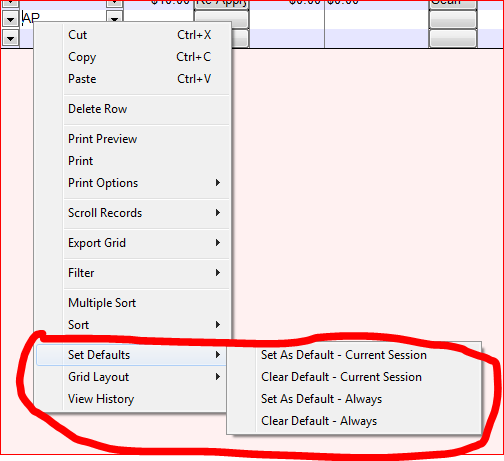
To set a Default Value for a column you enter the value and right-click on the column. On the menu select "Set Defaults". From there you can either "Set as Default - Current Session" or "Set as Default - Always". Setting as default for current sesion will remain the default only until you close the progam. Setting as default always will save the setting to the registry. It will remain as default on this computer even when you restart the program. The remove the deafult value setting choose the Clear Default settings.

 

closed with the note: JLS Solutions Help - Comments Only

Let's Welcome our New Members

  • npam of Bais Yaakov Elementary School - Feb 26, 2026

  • Zalmenrosenberger of Lizensk - Feb 25, 2026

  • Baistziporah of Bais Tziporah - Feb 25, 2026

  • Meisels S of Mosdos Satmar BP Inc. (UTA BP) - Feb 24, 2026

  • Wck of Willowbrook Community Kollel - Feb 17, 2026

  • Mr Y greenwald of Tov vchesed Rachmistrivka - Feb 10, 2026

  • Kritzler YS of pupa - Feb 09, 2026

  • Shimon of Vehareinu Skver - Feb 09, 2026

  • Gutwein of Lakefront - Feb 08, 2026

...