Tuition: Set Default Note Category

+1 vote
1,154 views

1 Answer

answered Nov 14, 2022 by YakovKantor
 
Best answer


Added (11/14/222)

We have added an option for users to set default category for notes in tuition.

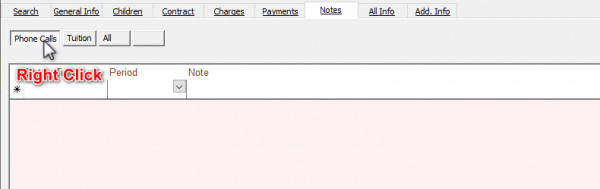
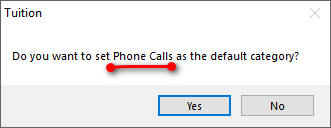
To set the default category first select the category you want as default, then right click on the category you would like. The system will confirm your selection.


commented Nov 15, 2022 by Kasho
Great Option Thanks!

It would be a great feature to be able to select the category by the time placing a call through Click-to-Call, on the pop-up screen when calling from the system, for example a category what the phone call is about.
commented Feb 25 by Chaya Rottenberg

It would be great to add a note category selector inside the click-to-call note pop-up so users can categorize notes at the time they are created, rather than having to edit them later. This would improve workflow and reduce manual steps.

commented Feb 25 by mspitzer
This would be helpful for us as well.

Let's Welcome our New Members

  • 1560 of Bais Yaakov of Spring valley - Sep 09, 2026

  • Brody of Yeshiva Bnos Ahavas Israel - Sep 07, 2026

  • JACOB BIENER of TOSH - Sep 03, 2026

  • ytvadmin of torah vodaath - Sep 02, 2026

  • 124245 of torah vodaath - Sep 02, 2026

  • yidel0681 of תפארת ישראל - Sep 01, 2026

  • Raizy Grunwald of Sinai Academic Center - Sep 01, 2026

  • Ohel Moshe of Ohel Moshe - Aug 27, 2026

  • B. Altman of Sinai academy - Aug 27, 2026

  • Blink of Yeshivat Amudeh Hatorah - Aug 26, 2026

...