Tuition: Set Default Note Category

+1 vote
1,252 views

1 Answer

answered Nov 14, 2022 by YakovKantor
 
Best answer


Added (11/14/222)

We have added an option for users to set default category for notes in tuition.

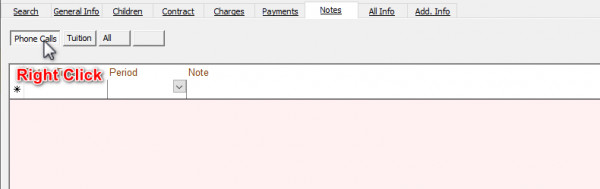
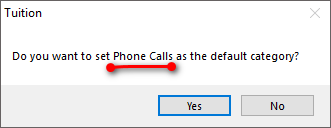
To set the default category first select the category you want as default, then right click on the category you would like. The system will confirm your selection.


commented Nov 15, 2022 by Kasho
Great Option Thanks!

It would be a great feature to be able to select the category by the time placing a call through Click-to-Call, on the pop-up screen when calling from the system, for example a category what the phone call is about.
commented Feb 25 by Chaya Rottenberg

It would be great to add a note category selector inside the click-to-call note pop-up so users can categorize notes at the time they are created, rather than having to edit them later. This would improve workflow and reduce manual steps.

commented Feb 25 by mspitzer
This would be helpful for us as well.

Let's Welcome our New Members

  • Tobys of Yeshiva Yagdil Torah - Nov 04, 2026

  • sdoppelt of TZAHLIM - Nov 02, 2026

  • Miss Spiegel of Sanz Klausenburg - Nov 02, 2026

  • dzigdon of Telshe Yeshiva - Oct 29, 2026

  • Elementary of Bais Malka - Oct 27, 2026

  • herskovitz of tosh mosdos - Oct 23, 2026

  • sholom8169 of Skver Yeshiva of Lakewood - Oct 22, 2026

  • mkatz of Mikvah USA - Oct 21, 2026

  • Cheiderbreslev of Cheider Breslev - Oct 21, 2026

  • YStern of Talmud Torah Ohr Moshe - Oct 21, 2026

...