Mail Merge for Applicants (Or any program)

0 votes
1,179 views

1 Answer

answered Mar 8, 2016 by Admin
selected Mar 8, 2016 by Admin
 
Best answer

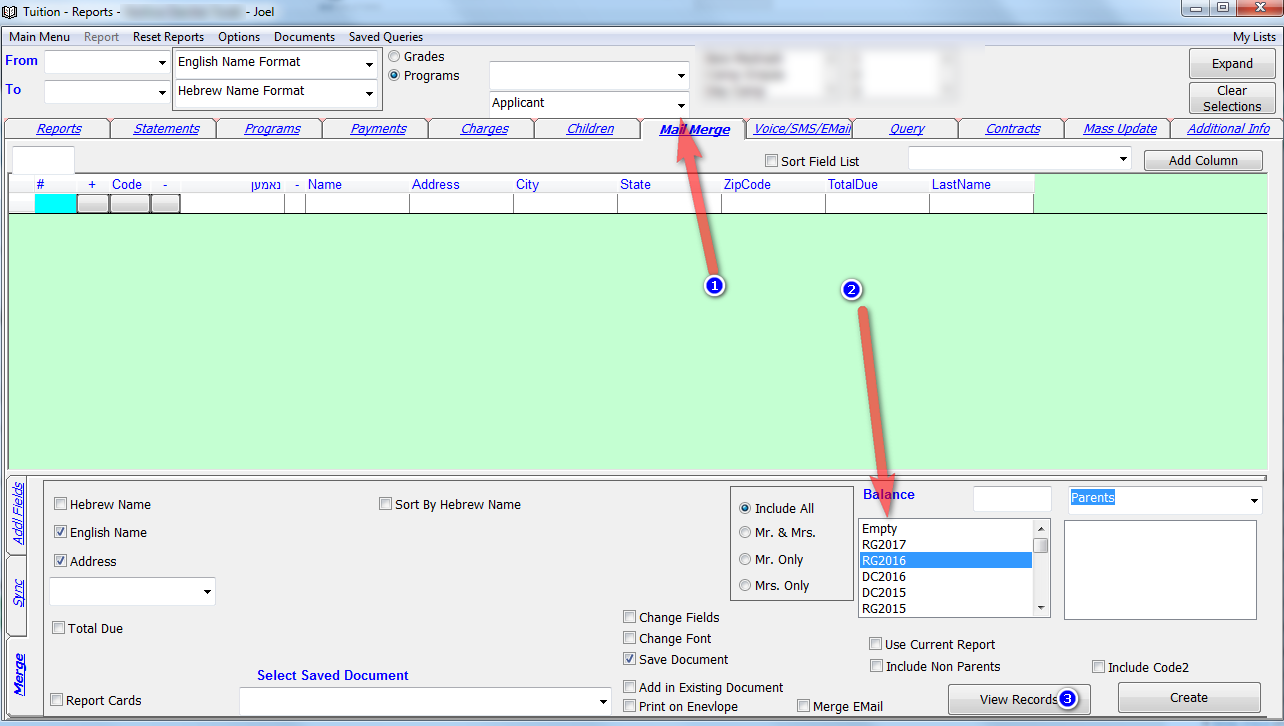
You can now choose a program from the top of the screen and the Mail Merge screen will show only Parents and Children from that program.

So lets say you want to create labels for Applicants you need to select Applicant on top and choose the period on bottom on click on view records. If your program periods are different than regular periods you will find the program periods on the bottom of the period list.



commented Jul 18, 2016 by mbs
can i get the program class in mail merge?
commented Jul 18, 2016 by Admin
You need to select the period from the bottom. Not from the top. Reread the above instructions.
commented Jul 18, 2016 by mbs
got it. Thank you!

Let's Welcome our New Members

  • Brody of Yeshiva Bnos Ahavas Israel - Sep 07, 2026

  • JACOB BIENER of TOSH - Sep 03, 2026

  • ytvadmin of torah vodaath - Sep 02, 2026

  • 124245 of torah vodaath - Sep 02, 2026

  • yidel0681 of תפארת ישראל - Sep 01, 2026

  • Raizy Grunwald of Sinai Academic Center - Sep 01, 2026

  • Ohel Moshe of Ohel Moshe - Aug 27, 2026

  • B. Altman of Sinai academy - Aug 27, 2026

  • Blink of Yeshivat Amudeh Hatorah - Aug 26, 2026

  • Havineini of UTA - Aug 25, 2026

...