How do I create a query for a list of account numbers, student numbers or last names?

+1 vote
561 views
asked Mar 4, 2015 in How To by Admin
reopened Dec 25, 2018 by yczehn
How do I create a query for a list of account numbers, student numbers or last names?

1 Answer

answered Dec 25, 2018 by yczehn
 
Best answer

Go to the General Info tab under the query screen.

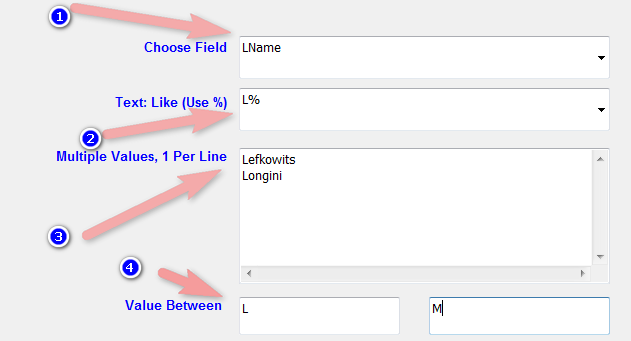
Choose the field you want to query on (1). You can any or all of the following filters.

Text (2): Enter any text or a single account number. You can use the Like wildcards (%).

Multiple Values (3): You can enter on every line a single text to query. So if for example you want to query for 10 accounts you enter all of them one on each line.

Value Between (4): Let’s say you to query all accounts until letter L; you just enter an L in the second box. Later when you want to query from L you enter an L only in the first box. If you want between F and L, you fill in both boxes.



Let's Welcome our New Members

  • Wck of Willowbrook Community Kollel - Feb 17, 2026

  • Mr Y greenwald of Tov vchesed Rachmistrivka - Feb 10, 2026

  • Kritzler YS of pupa - Feb 09, 2026

  • Shimon of Vehareinu Skver - Feb 09, 2026

  • Gutwein of Lakefront - Feb 08, 2026

  • dgross of yeshiva orchos chaim - Feb 03, 2026

  • SrulyF of JLS - Feb 02, 2026

  • Flor of Little Munchkins Playgroup 56 Inc - Jan 29, 2026

...